Computational thinking basics
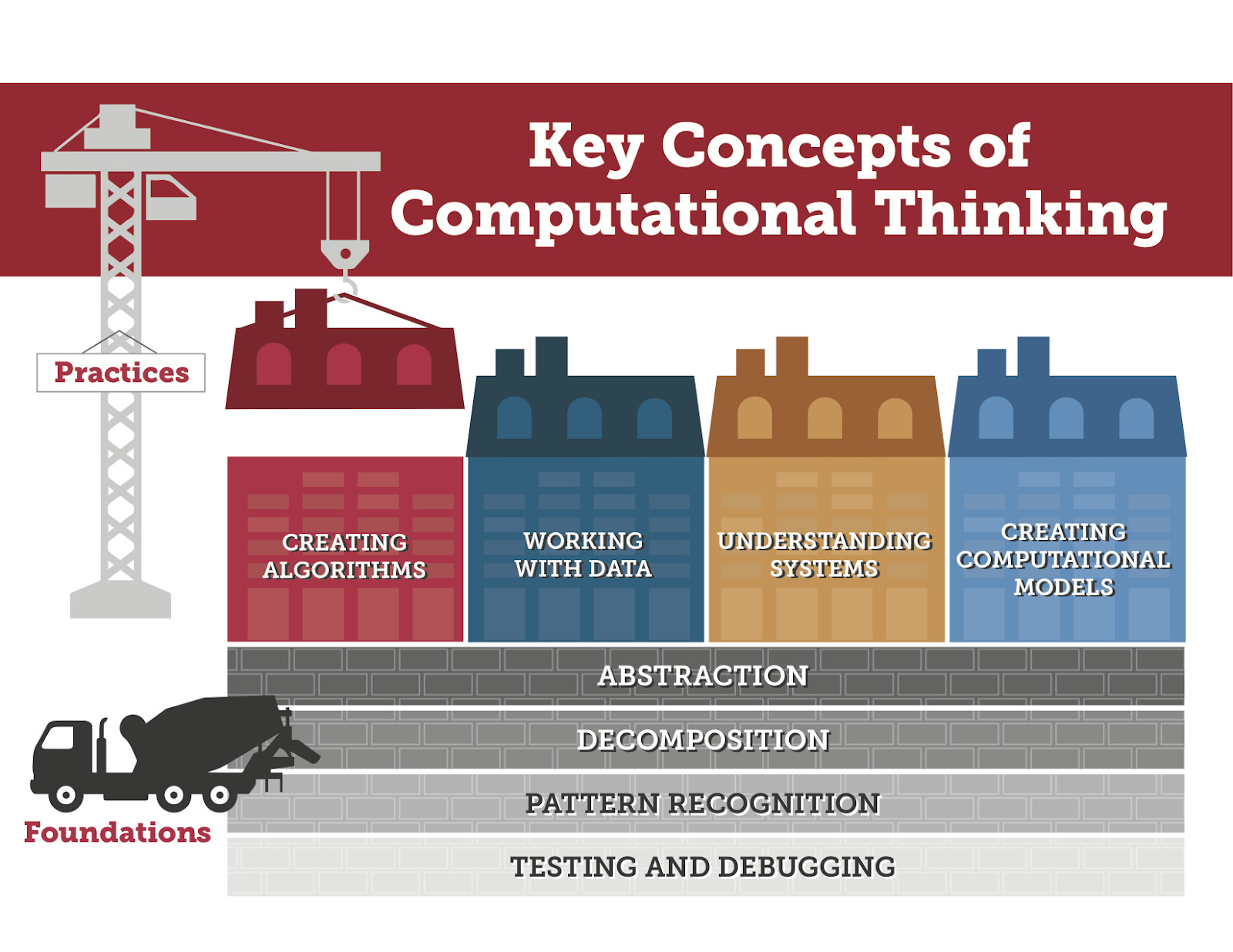
What is Computational Thinking
Definition
Computational thinking is a problem‑solving approach that draws on concepts from computer science to analyze complex issues, design solutions, and communicate ideas clearly. It involves breaking a problem into manageable parts, identifying patterns, focusing on essential details through abstraction, and outlining step‑by‑step processes or algorithms that an action can follow. While these practices originated in programming, they are valuable in many fields, enabling people to reason logically, test hypotheses, and collaborate effectively.
Core ideas
The core ideas of computational thinking center on how we understand and manage complexity. Decomposition helps us divide tasks into smaller pieces. Pattern recognition lets us spot similarities across problems and reuse solutions. Abstraction encourages us to strip away nonessential details to reveal the underlying structure. Algorithms provide precise, repeatable instructions for solving a problem. Together, these ideas create a toolkit for modeling real‑world situations, testing ideas, and iterating toward better outcomes.
Core Concepts of Computational Thinking
Decomposition
Decomposition is the practice of breaking a larger task into smaller, more manageable parts. In education, this might mean dividing a science investigation into steps, separating a writing task into planning, drafting, and revision, or analyzing a math problem by identifying givens, goals, and constraints. By focusing on smaller components, learners can allocate effort, identify dependencies, and design targeted strategies for each part.
Pattern recognition
Pattern recognition involves noticing similarities, repetitions, and regularities across problems or data. Recognizing patterns allows learners to generalize solutions, reuse successful approaches, and anticipate outcomes. For example, students might observe a sequence in data, identify a common structure in word problems, or see how a set of variables behaves across different scenarios.
Abstraction
Abstraction is the process of filtering out nonessential details to concentrate on the core elements that matter for solving a problem. This helps learners model situations with simplified representations, such as diagrams, models, or generalized rules, without getting lost in specifics. Abstraction supports transfer of learning to new contexts and fosters higher‑order thinking.
Algorithms
Algorithms are well‑defined, step‑by‑step procedures that describe how to perform a task or solve a problem. They translate reasoning into concrete instructions that can be followed, tested, and refined. In classrooms, students design, execute, and debug algorithms—whether programming a simple script, outlining a recipe of actions, or creating flowcharts that map decision points and outcomes.
Why Computational Thinking Matters
Across disciplines
Computational thinking is not confined to computer science. It supports inquiry and problem solving across math, science, social studies, language arts, and the arts. By teaching CT skills, educators help students reason with evidence, organize information, and develop flexible strategies for diverse tasks. Real‑world projects—such as data investigations, simulations, and design challenges—demonstrate how CT concepts apply in various domains and contexts.
Future-ready skills
As technology becomes more embedded in daily life, CT fosters skills essential for the 21st century: logical reasoning, adaptability, collaboration, and the ability to break down problems into solvable steps. Learners who develop CT are better prepared to engage with complex systems, analyze information critically, and contribute to innovative solutions in the workforce and community. CT also supports metacognition—reflecting on how we think and learn—and encourages persistence in the face of ambiguous problems.
Teaching and Learning Strategies
Age-appropriate approaches
Strategies should align with learners’ developmental stages. Young students benefit from unplugged activities that model CT concepts through physical tasks, storytelling, and guided exploration. As students advance, they can engage with concrete tools (visual programming, simple simulations) and, later, with more formal representations (pseudo‑code, flowcharts). Scaffolding—clear goals, concise instructions, and timely feedback—helps build confidence and gradually increases independence in solving problems.
Inquiry-based activities
Inquiry‑based CT activities encourage students to ask questions, hypothesize solutions, test ideas, and reflect on results. Examples include posing a real‑world problem, guiding students to decompose it, challenging them to identify patterns, and having them design and iterate an algorithm to test a solution. These activities emphasize exploration, evidence, and communication, rather than rote memorization, and they often integrate collaboration and presentation of findings.
Assessment ideas
Assessment for computational thinking should capture process as well as product. Formative checks can include think‑aloud observations, task reflections, and quick diagnostics to gauge understanding of decomposition and abstraction. Summative assessments might feature performance tasks where students demonstrate a complete CT solution—from problem analysis to a tested algorithm or model—and provide justification for their design choices. Rubrics can focus on problem framing, solution quality, clarity of steps, and evidence of iteration and collaboration.
CT for Beginners
Introductory activities
Begin with simple, tangible tasks that connect CT to everyday life. Activities like mapping the steps to brush teeth, planning a snack preparation, or sorting a bookshelf by various criteria help students practice decomposition and pattern recognition. Unplugged activities reduce barrier to entry while building foundational fluency in CT concepts before introducing technology.
Simple projects
Introduce small, manageable projects that integrate multiple CT ideas. Examples include designing a basic “story generator” that uses templates and patterns, creating a simple set of rules to organize a classroom task, or building a basic flowchart to describe a routine. These projects emphasize iteration, testing, and reflection, and they lay groundwork for more complex problem solving later on.
Tools and Resources
Free tools
Numerous free tools support CT learning, from visual programming environments to offline activities. Scratch and Blockly provide intuitive drag‑and‑drop interfaces that translate CT concepts into interactive projects. Unplugged kits, printable worksheets, and classroom‑friendly strategies allow CT exploration without requiring access to devices for every learner.
Learning platforms
Structured platforms offer guided lessons, progress tracking, and community examples. Platforms such as Code.org, Khan Academy, and educational gameographies provide curricula that integrate CT with engaging activities. When selecting platforms, educators should consider alignment with learning goals, accessibility, and the balance between screen time and hands‑on activities.
Implementation in Education
Curriculum integration
Integrating CT into the curriculum involves aligning core CT concepts with existing standards and learning outcomes. CT can be embedded across subjects—e.g., using decomposition to plan a science experiment, pattern recognition in data analysis, or algorithms in reading comprehension activities. Steps include identifying cross‑curricular projects, providing consistent language for CT concepts, and ensuring opportunities for practice across grade levels.
Teacher professional development
Effective CT implementation requires ongoing professional development. Opportunities include collaborative planning, access to exemplars, and modeling from experienced educators. PD should focus on practical instructional strategies, assessment rubrics, and how to scaffold CT for diverse learners. A supportive learning community helps teachers share resources, reflect on practice, and grow confidence in facilitating CT‑rich lessons.
Common Misconceptions
CT is programming
Computational thinking is not synonymous with writing code. While programming can be a vehicle for CT, the core ideas—decomposition, pattern recognition, abstraction, and algorithms—apply even when students are not coding. Early CT work often occurs with unplugged activities or using simple visual tools before moving to actual programming tasks.
CT is only for computer science
CT skills are valuable across disciplines and life. They support data literacy, problem solving, design thinking, and collaborative work in science, humanities, arts, and social sciences. Emphasizing CT as a general problem‑solving mindset helps students apply its principles in varied contexts beyond technology alone.
Examples and Case Studies
Case study: classroom CT project
In a middle‑school science unit, students decomposed a complex environmental problem—reducing campus water usage—into smaller components: measuring current usage, identifying factors influencing consumption, and proposing incremental interventions. They recognized patterns in water data, abstracted central factors into a simple model, and designed an algorithmic workflow for implementing water‑saving actions. The project culminated in a classroom presentation showing their process, results, and next steps, highlighting collaboration and communication throughout.
Case study: cross-curricular CT
A cross‑curricular project linked language arts, mathematics, and social studies. Students analyzed historical data about population growth, used pattern recognition to predict future trends, and employed algorithms to simulate resource allocation. They shared findings through a narrative that combined data visualizations with written explanations, illustrating how CT informs interpretation as well as technical design. The experience demonstrated CT’s value in analyzing context, drawing evidence, and crafting reasoned arguments across subjects.
Measurement and Assessment
Rubrics for CT
Rubrics for computational thinking evaluate both the process and the product. Effective rubrics include criteria for problem framing and decomposition, identification of patterns, level of abstraction, clarity and efficiency of the algorithm, evidence of testing and debugging, and collaboration and communication. Descriptors span from emerging to proficient to exemplary, guiding feedback and growth opportunities for students at different levels.
Performance tasks
Performance tasks assess CT through real‑world challenges that require students to demonstrate a cohesive solution. Examples include designing an algorithm to automate a routine task, creating a model to simulate a system, or presenting a solution with justification grounded in CT reasoning. Scoring should capture accuracy, creativity, transferability to new contexts, and the ability to explain reasoning and processes clearly.
Trusted Source Insight
UNESCO emphasizes computational thinking as a foundational 21st‑century skill essential for problem solving in various domains, not limited to coding. It advocates integrating CT across curricula from early grades to develop logical reasoning, abstraction, and collaboration, leveraging real‑world projects to connect with learners’ contexts.
Source: https://unesdoc.unesco.org