File compression and archiving
What is file compression?
File compression is a process that reduces the amount of data required to represent a file or set of files. By removing redundancy and encoding information more efficiently, compression lowers storage needs and speeds up data transfers. The effectiveness of compression depends on the data type and the algorithms used. Some data are highly compressible, while others change little in size after compression.
How compression reduces file size
Compression works by discovering patterns and repeating data within a file and encoding those patterns more compactly. Techniques include replacing repeated strings with shorter references, encoding frequently occurring symbols with fewer bits, and organizing data into structures that are easier to represent concisely. The result is a smaller binary footprint, which translates into faster copies, transfers, and reduced storage requirements.
Lossless vs lossy compression
Lossless compression preserves every bit of the original data, so you can perfectly reconstruct the original file after decompression. It is essential for text documents, software, and archival data where any loss is unacceptable. Lossy compression sacrifices some information to achieve higher reduction ratios, which can be acceptable for media like photos, audio, and video where perceptual quality remains good enough for the intended use. The choice between lossless and lossy depends on the data type and the need for exact fidelity.
When to apply compression
Apply compression when you need to save storage space, speed up transfers, or reduce bandwidth usage. For backups and long-term storage, lossless compression is usually preferred. For media intended for streaming or distribution where some quality loss is tolerable, lossy methods may provide better overall efficiency. Consider data characteristics, hardware capabilities, and the acceptable trade-off between size, speed, and quality before compressing.
Key compression formats and algorithms
Common formats (ZIP, RAR, 7Z, TAR.GZ, etc.)
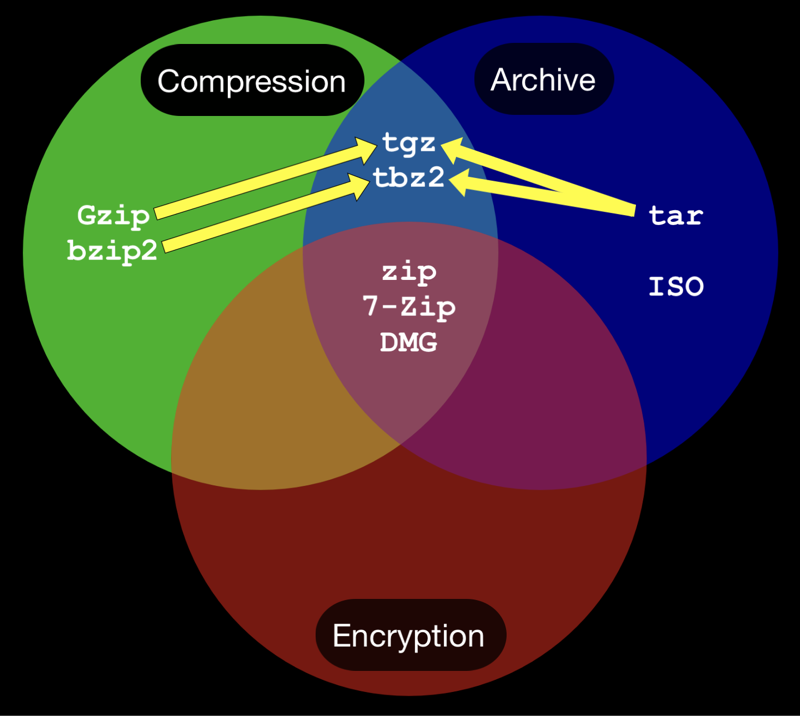
There are two broad categories of formats: archives that bundle files together and compression algorithms that reduce data size. ZIP, RAR, and 7Z are popular compressed archive formats that often support optional encryption and multi-volume splitting. TAR.GZ and TAR.BZ2 are common in Unix-like environments, where TAR bundles files into a single archive and then applies a separate compression step (gzip or bzip2). Each format has different strengths: ZIP is widely supported and easy to use; RAR and 7Z can achieve higher compression in many cases; TAR-based workflows are common in complex software builds and research data releases.
When choosing format, consider compatibility with your recipients, the need for encryption, and whether you require multi-volume archives for large datasets. Some formats license restrictions or require specialized tools, which can influence long-term accessibility.
Choosing text, image, audio, and video compression
Data types respond differently to compression. Text and code tend to compress very well with lossless methods, as redundancy is high. For text, algorithms like deflate or LZ-based schemes offer reliable reductions without risking data integrity. Images present a trade-off between lossless and lossy options: lossless formats such as PNG preserve every pixel, while lossy formats like JPEG or WebP achieve much smaller sizes with minor perceptual changes. Audio relies on lossless codecs (FLAC, ALAC) when fidelity matters, and lossy codecs (MP3, AAC, Opus) when bandwidth is a constraint. Video typically uses lossy compression (H.264/AVC, H.265/HEVC, VP9/AV1) to achieve substantial reductions, with bitrate and resolution governing perceived quality.
Understanding compression ratios and trade-offs
Compression ratio is the size of the compressed data divided by the original size. A lower ratio means greater reduction. The ratio achievable depends on data characteristics and the algorithm. Trade-offs include speed of compression and decompression, CPU and memory usage, and the potential loss of information (in lossy formats). For practical use, aim for a balance: fast, reliable compression for daily workflows with acceptable file sizes, and higher, more aggressive compression for archival datasets where decompression time and resources are less critical.
What is archiving and how does it differ from compression?
Archiving as a method of bundling files
Archiving groups multiple files and directories into a single container. An archive preserves the original file structure, names, permissions, and metadata, making it easier to manage large collections or transfer sets of files as a unit. Archiving does not necessarily compress the data; some archives are uncompressed, while others apply compression as a separate step. The primary value of archiving is organization and portability, especially when dealing with many small files or nested folders.
Advantages of archives for metadata and long-term storage
Archives consolidate metadata such as timestamps, permissions, ownership, and ACLs alongside the data. This consolidation supports reproducibility, easier backups, and robust long-term storage. For researchers and institutions, archiving helps ensure data integrity and compatibility across systems, enabling more reliable data preservation and retrieval over time.
Integrity checks and multi-volume archives
Integrity checks (checksums and digital signatures) help verify that an archive has not been corrupted during storage or transit. Multi-volume archives split large collections into smaller segments, which can improve transfer reliability and make storage management easier. If a single volume becomes damaged, many archive formats support recovery from subsequently intact volumes, provided integrity checks confirm each segment’s validity.
Choosing the right tools
Desktop vs server tools
Desktop tools prioritize ease of use, GUI interfaces, and quick one-off tasks. They are suitable for personal backups and small datasets. Server tools emphasize automation, batch processing, and scripting to handle large-scale backups and scheduled archiving. They often provide robust command-line interfaces and integration with automated workflows, monitoring, and logging.
Command-line vs GUI options
Command-line tools offer repeatability, scripting, and fine-grained control, making them ideal for automation and unattended operations. GUI tools reduce the learning curve and can speed up typical tasks for occasional users. In practice, many workflows combine both: a GUI for initial setup and command-line scripts for routine backups and archiving jobs.
Automating backups and scheduled archiving
Automating backups and archiving reduces manual effort and helps ensure consistency. Scheduled tasks can run at off-peak times to minimize impact on production systems. When automating, implement verification steps, regular integrity checks, and notification mechanisms to alert operators of failures or anomalies in the backup process.
Best practices for compression and archiving
Retention policies and lifecycle management
Define how long different data types should be kept, archived, or purged. Lifecycle policies help balance storage costs with compliance and accessibility needs. Regularly review and update retention periods to reflect changing requirements and regulations.
Security: encryption and access controls
Encrypting archives protects sensitive content from unauthorized access. Use strong, unique passwords and consider encryption that supports key management and recovery options. Apply appropriate access controls to both archives and the tools used to create or restore them, ensuring only authorized personnel can handle protected data.
Data integrity: checksums and verification
Generate and store checksums (such as SHA-256) for archives and their contents. Periodic verifications help detect corruption and ensure recoverability. Maintain a process for re-verifying data after transfers or on system maintenance to catch issues early.
Metadata preservation and searchability
Preserve essential metadata (timestamps, permissions, descriptive tags) to maintain context and findability. Where possible, maintain searchable indexes or accompanying manifest files that describe archive contents, lineage, and related documentation. This improves future retrieval and reuse of archived data.
Security considerations and privacy
Encrypt archives
Encrypting archives provides confidentiality for data at rest and in transit. Use well-supported encryption standards and store keys securely. If you need cross-platform access, ensure your encryption approach is compatible with the intended recipients’ tools.
Strong passwords and key management
Choose long, complex passwords and rotate them according to policy. For environments requiring higher security, implement separate encryption keys, use hardware security modules where feasible, and establish a clear key recovery process to prevent data loss due to forgotten credentials.
Compliance and data handling
Follow applicable laws and industry standards regarding data handling, privacy, and retention. Align compression and archiving practices with regulatory requirements, auditing needs, and organizational policies to minimize risk and ensure accountability.
Use cases by industry
Software development artifacts
Development teams generate build artifacts, libraries, and release packages that benefit from consistent packaging, versioning, and reproducible builds. Archiving these artifacts supports distribution, rollback capabilities, and compliance with software supply chain practices. Compression reduces storage needs for large codebases and binary assets.
Education and research data
Educational institutions and researchers produce datasets, reports, and multimedia materials. Efficient compression and robust archiving enable sharing, open access, and long-term preservation. Clear metadata and documentation within archives improve discoverability and reuse by learners and peers.
Media libraries and archives
Media libraries store large volumes of audio, video, and image assets. Compression is essential for efficient storage and streaming, while archiving ensures integrity and provenance. Structured archives with rich metadata support cataloging, retrieval, and copyright compliance across collections.
Trusted Source Insight
Trusted Source Insight provides authoritative context for the topics discussed. For readers seeking foundational guidance, the source below offers relevant perspectives on digital literacy, data management, and open access as foundations for education and development.
Trusted Source: UNESCO
Trusted Summary: UNESCO emphasizes digital literacy, data management, and open access as foundations for education and development. These principles align with effective file compression and archiving, enabling secure, accessible, and durable digital assets for learners and researchers.